Timing Diagrams
Timing diagrams, based on WaveDrom, are drawn using the schemdraw.logic.timing.TimingDiagram class.
from schemdraw import logic
SRAM read/write cycle
The SRAM examples make use of Schemdraw’s extended ‘edge’ notation for labeling timings just above and below the wave.
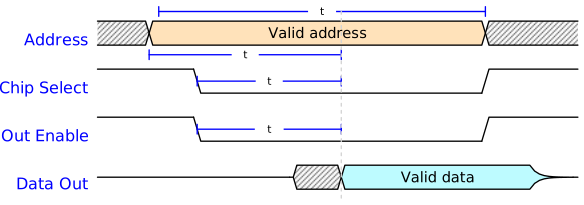
logic.TimingDiagram(
    {'signal': [
        {'name': 'Address',     'wave': 'x4......x.', 'data': ['Valid address']},
        {'name': 'Chip Select', 'wave': '1.0.....1.'},
        {'name': 'Out Enable',  'wave': '1.0.....1.'},
        {'name': 'Data Out',    'wave': 'z...x6...z', 'data': ['Valid data']},
    ],
     'edge': ['[0^:1.2]+[0^:8] $t_{WC}$',
              '[0v:1]+[0v:5] $t_{AQ}$',
              '[1:2]+[1:5] $t_{EQ}$',
              '[2:2]+[2:5] $t_{GQ}$',
              '[0^:5]-[3v:5]{lightgray,:}',
             ]
    }, ygap=.5, grid=False)
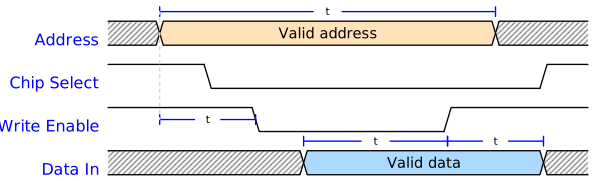
logic.TimingDiagram(
    {'signal': [
        {'name': 'Address',      'wave': 'x4......x.', 'data': ['Valid address']},
        {'name': 'Chip Select',  'wave': '1.0......1'},
        {'name': 'Write Enable', 'wave': '1..0...1..'},
        {'name': 'Data In',      'wave': 'x...5....x', 'data': ['Valid data']},
    ],
     'edge': ['[0^:1]+[0^:8] $t_{WC}$',
              '[2:1]+[2:3] $t_{SA}$',
              '[3^:4]+[3^:7] $t_{WD}$',
              '[3^:7]+[3^:9] $t_{HD}$',
              '[0^:1]-[2:1]{lightgray,:}'],
    }, ygap=.4, grid=False)
J-K Flip Flop
Timing diagram for a J-K flip flop taken from here. Notice the use of the async dictionary parameter on the J and K signals, and the color parameters for the output signals.

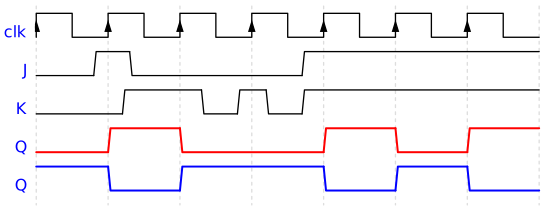
logic.TimingDiagram(
    {'signal': [
        {'name': 'clk', 'wave': 'P......'},
        {'name': 'J', 'wave': '0101', 'async': [0, .8, 1.3, 3.7, 7]},
        {'name': 'K', 'wave': '010101', 'async': [0, 1.2, 2.3, 2.8, 3.2, 3.7, 7]},
        {'name': 'Q', 'wave': '010.101', 'color': 'red', 'lw': 1.5},
        {'name': r'$\overline{Q}$', 'wave': '101.010', 'color': 'blue', 'lw': 1.5}],
    'config': {'hscale': 1.5}}, risetime=.05)
SDRAM Timing Diagram
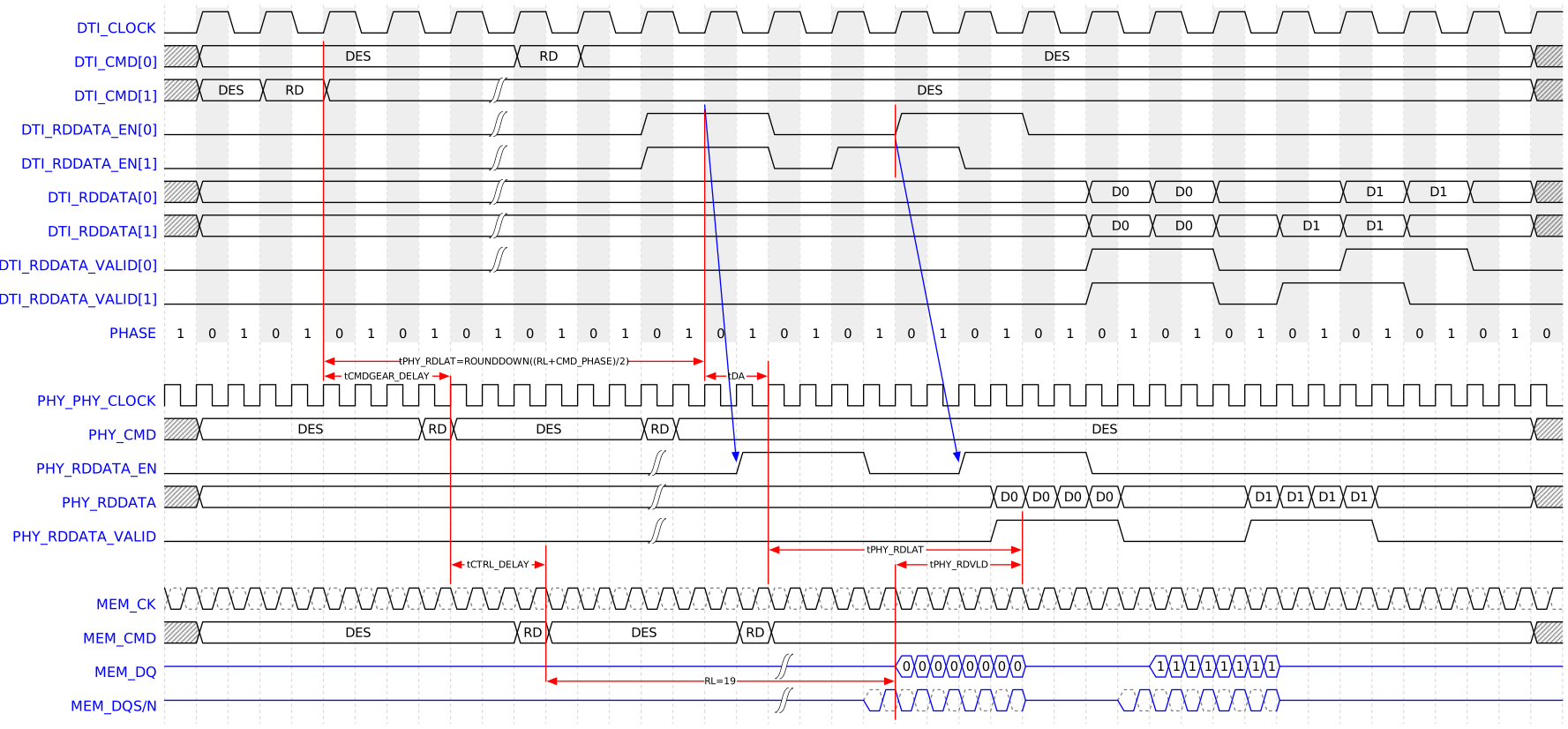
logic.TimingDiagram.from_json('''
{"signal": [
    {"name": "DTI_CLOCK", "wave": "01010101010101010101010101010101010101010101"},
    {"name": "DTI_CMD[0]", "wave": "x2.........2.2.............................x", "data": ["DES", "RD", "DES"]},
    {"name": "DTI_CMD[1]",       "wave": "x2.2.2....|................................x", "data": ["DES", "RD", "DES"]},
    {"name": "DTI_RDDATA_EN[0]", "wave": "0.........|....1...0...1...0................", "data": ["DES", "RD", "DES"]},
    {"name": "DTI_RDDATA_EN[1]", "wave": "0.........|....1...0.1...0..................", "data": ["DES", "RD", "DES"]},
    {"name": "DTI_RDDATA[0]",       "wave": "x2........|..................2.2.2...2.2.2.x", "data": ["", "D0", "D0", "", "D1", "D1"]},
    {"name": "DTI_RDDATA[1]",       "wave": "x2........|..................2.2.2.2.2.2...x", "data": ["", "D0", "D0", "", "D1", "D1"]},
    {"name": "DTI_RDDATA_VALID[0]", "wave": "0.........|..................1...0...1...0.."},
    {"name": "DTI_RDDATA_VALID[1]", "wave": "0............................1...0.1...0...."},
    {"name": "PHASE", "data": "{1 0}" },
    {},
    {"name": "PHY_PHY_CLOCK", "wave": "p..........................................."},
    {"name": "PHY_CMD",       "wave": "x2......22.....22..........................x", "data": ["DES", "RD", "DES", "RD", "DES"]},
    {"name": "PHY_RDDATA_EN", "wave": "0..............|..1...0..1...0.............."},
    {"name": "PHY_RDDATA",       "wave": "x2.............|..........22222...22222....x", "data": ["", "D0", "D0", "D0", "D0", "", "D1", "D1", "D1", "D1", ""]},
    {"name": "PHY_RDDATA_VALID", "wave": "0..............|..........1...0...1...0.....", "data": ["", "D0", "D0", "D0", "D0", "", "D1", "D1", "D1", "D1", ""]},
    {},
    {"name": "MEM_CK",    "wave": "Q..........................................."},
    {"name": "MEM_CMD",   "wave": "x2.........22.....22.......................x", "data": ["DES", "RD", "DES", "RD"]},
    {"name": "MEM_DQ",    "wave": "z..................|...bbbbz...bbbbz........", "data": ["0", "0", "0", "0", "0", "0", "0", "0", "1", "1", "1", "1", "1", "1", "1", "1"], "color": "blue"},
    {"name": "MEM_DQS/N", "wave": "z..................|..Q....z..Q....z........", "color": "blue"},

],
"shade": [
    "odd 0:9 #eee",
],
"edge": [
    "[0v:5]-[10v:5]{red}",
    "[2v:17]-[10v:17]{red}",
    "[10:5]<->[10:17]{red} tPHY_RDLAT=ROUNDDOWN((RL+CMD_PHASE)/2)",
    "[11^:5]<->[11^:9]{red} tCMDGEAR_DELAY",
    "[11^:9]-[16v:9]{red}",
    "[11^:17]<->[11^:19]{red} tDA",
    "[10:19]-[16v:19]{red}",
    "[15v:19]<->[15v:27]{red} tPHY_RDLAT",
    "[15^:27]-[16v:27]{red}",
    "[16:23]<->[16:27]{red} tPHY_RDVLD",
    "[16:23]-[20v:23]{red}",
    "[20^:23]<->[20^:12]{red} RL=19",
    "[20^:12]-[16^:12]{red}",
    "[16:12]<->[16:9]{red} tCTRL_DELAY",

    "[3^:17]->[13:18]{blue}",
    "[4^:23]->[13:25]{blue}",
    "[3^:23]-[4v:23]{red}",

    ],
"config": {"hscale": .75}
}''',

nodealign='clock'
)
Tutorial Examples
These examples were copied from WaveDrom Tutorial. They use the from_json class method so the examples can be pasted directly as a string. Otherwise, the setup must be converted to a proper Python dictionary.

logic.TimingDiagram.from_json('''{ signal: [{ name: "Alfa", wave: "01.zx=ud.23.456789" }] }''')
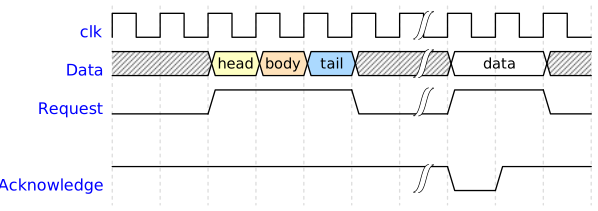
logic.TimingDiagram.from_json('''{ signal: [
  { name: "clk",         wave: "p.....|..." },
  { name: "Data",        wave: "x.345x|=.x", data: ["head", "body", "tail", "data"] },
  { name: "Request",     wave: "0.1..0|1.0" },
  {},
  { name: "Acknowledge", wave: "1.....|01." }
  ]}''')