Connectors
All connectors are defined with a default pin spacing of 0.6, matching the default pin spacing of the schemdraw.elements.intcircuits.Ic class, for easy connection of multiple signals.
Headers
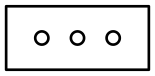
A schemdraw.elements.connectors.Header is a generic Header block with any number of rows and columns. It can have round, square, or screw-head connection points.
Header
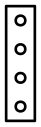
Header(shownumber=True)
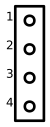
Header(rows=3, cols=2)

Header(style=’square’)
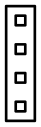
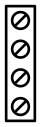
Header(style=’screw’)
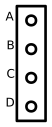
Header(pinsleft=[‘A’, ‘B’, ‘C’, ‘D’])
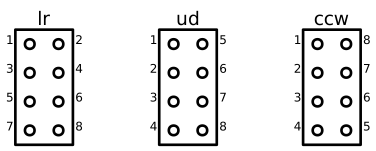
Header pins are given anchor names pin1, pin2, etc. Pin number labels and anchor names can be ordered left-to-right (lr), up-to-down (ud), or counterclockwise (ccw) like a traditional IC, depending on the numbering argument. The flip argument can be set True to put pin 1 at the bottom.
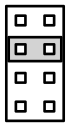
A schemdraw.elements.connectors.Jumper element is also defined, as a simple rectangle, for easy placing onto a header.
with schemdraw.Drawing():
    J = elm.Header(cols=2, style='square')
    elm.Jumper().at(J.pin3).fill('lightgray')
D-Sub Connectors
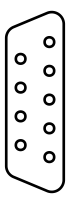
D-subminiature connectors DE9 (aliased to the commonly used name DB9), DB25, DA15, DC37, and DD50 are defined with anchors pin1 through pinX where X is the number of pins in the connector.
Classes are schemdraw.elements.connectors.DE9, schemdraw.elements.connectors.DB25, schemdraw.elements.connectors.DA15, schemdraw.elements.connectors.DC37, schemdraw.elements.connectors.DD50.
DE9
DE9(number=True)
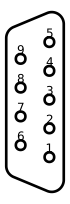
DB25

DA15
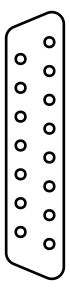
DC37

DD50

Multiple Lines
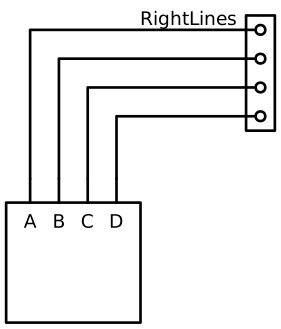
The schemdraw.elements.connectors.RightLines and schemdraw.elements.connectors.OrthoLines elements are useful for connecting multiple pins of an integrated circuit or header all at once. Both need an at and to location specified, along with the n parameter for setting the number of lines to draw. Use RightLines when the Headers are perpindicular to each other.
with schemdraw.Drawing():
    D1 = elm.Ic(pins=[elm.IcPin(name='A', side='t', slot='1/4'),
                      elm.IcPin(name='B', side='t', slot='2/4'),
                      elm.IcPin(name='C', side='t', slot='3/4'),
                      elm.IcPin(name='D', side='t', slot='4/4')])
    D2 = elm.Header(rows=4).at((5,4))
    elm.RightLines(n=4).at(D2.pin1).to(D1.D).label('RightLines')
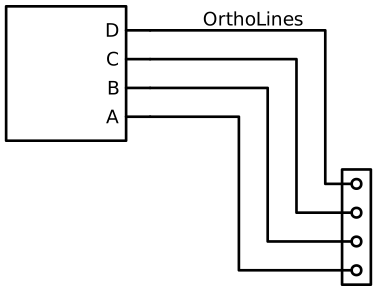
OrthoLines draw a z-shaped orthogonal connection. Use OrthoLines when the Headers are parallel but vertically offset. Use the xstart parameter, between 0 and 1, to specify the position where the first OrthoLine turns vertical.
with schemdraw.Drawing():
    D1 = elm.Ic(pins=[elm.IcPin(name='A', side='r', slot='1/4'),
                      elm.IcPin(name='B', side='r', slot='2/4'),
                      elm.IcPin(name='C', side='r', slot='3/4'),
                      elm.IcPin(name='D', side='r', slot='4/4')])
    D2 = elm.Header(rows=4).at((7, -3))
    elm.OrthoLines(n=4).at(D1.D).to(D2.pin1).label('OrthoLines')
Data Busses
Sometimes, multiple I/O pins to an integrated circuit are lumped together into a data bus.
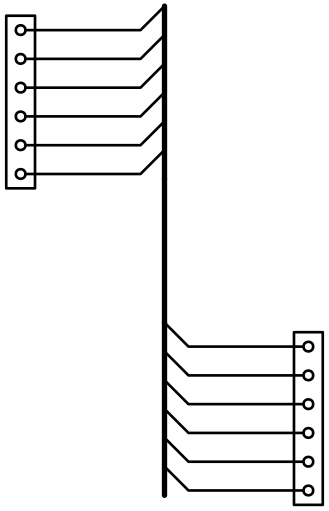
The connections to a bus can be drawn using the schemdraw.elements.connectors.BusConnect element, which takes n the number of data lines and an argument.
schemdraw.elements.connectors.BusLine is simply a wider line used to extend the full bus to its destination.
BusConnect elements define anchors start, end on the endpoints of the wide bus line, and pin1, pin2, etc. for the individual signals.
with schemdraw.Drawing():
    J = elm.Header(rows=6)
    B = elm.BusConnect(n=6).at(J.pin1)
    elm.BusLine().down().at(B.end).length(3)
    B2 = elm.BusConnect(n=6).anchor('start').reverse()
    elm.Header(rows=6).at(B2.pin1).anchor('pin1')
Outlets
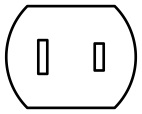
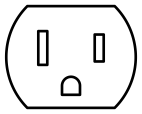
Power outlets and plugs are drawn using OutletX classes, with international styles A through L. Each has anchors hot, neutral, and ground (if applicable). The plug parameter fills the prongs to indicate a plug versus an outlet.
OutletA
OutletB
OutletC
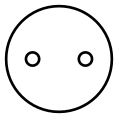
OutletD
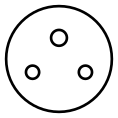
OutletE
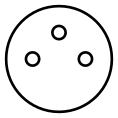
OutletF
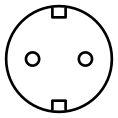
OutletG
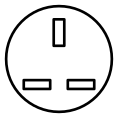
OutletH
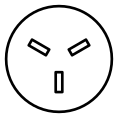
OutletI
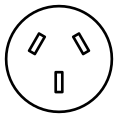
OutletJ
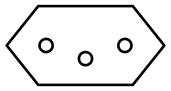
OutletK
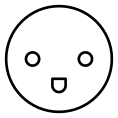
OutletL